|
データシートサーチシステム |
|
|
データシートサーチシステム |
|
CWA-STANDARD-R データシート(PDF) 3 Page - NXP Semiconductors |
|
|
|||||||||||||||||||||||||||||
CWA-STANDARD-R データシート(HTML) 3 Page - NXP Semiconductors |
|
|
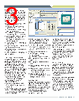
3 / 4 page  Build System The CodeWarrior build system helps you develop applications with the smallest code size and fastest execution time. The build system for HC(S)08 and ColdFire have been in production devices for well over 15 years— they represent the robust, reliable tools you can trust will come from Freescale. Primary features include: • Optimizing ANSI C compilers for HC(S)08, RS08 and V1 ColdFire that: Operate off a standard front-end for consistent syntax Generate standard ELF/DWARF files for execution and debugging Include ANSI C compatible standard libraries and compact runtime libraries • Compiler provides HCS08 to V1 ColdFire migration assistance by automatically flagging code that needs to be manually inspected and/or ported • HC(S)08 C++ compiler includes support for EC++ guidelines • V1 ColdFire C++ compiler includes ISO C++ compatible standard libraries • Macro assemblers for HC(S)08, RS08 and V1 ColdFire MCUs • Linkers that dead-strip unused code for the optimal code size Graphical Source-Level Debugger The CodeWarrior tool suite includes a state- of-the-art source-level debugger with a wide array of sophisticated features that help you troubleshoot and repair your application faster. This common debugger gives you consistent debug tools for the Controller Continuum. The debugger provides the power you need with the simplicity of a Windows® based point-and-click environment for fast and easy execution. Key capabilities include: • C and assembly source code windows provide debug support for RS08, HC08, HCS08 and V1 ColdFire processors • Precise breakpoints help solve sophisticated problems • Complex, emulator-like debug capability using HCS08 and V1 ColdFire on-chip trace features • Graphical display of data values, complex data structures and expressions to speed run-time analysis, without stopping or single stepping the processor • Detailed information on every aspect of your project: break points, watch points, stack, symbol table, pending events, pending exceptions and I/O registers • Full-chip simulation for most HC(S)08, RS08 and V1 ColdFire microcontrollers including CPU instruction set, peripherals, interrupts and I/O • Support for kernel aware debugging • Fast flash programming support: HC08: Via MON08 HCS08, RS08, V1 ColdFire: Via BDM • Ability to preserve a memory range during programming • Ability to program user-selectable TRIM values • Support for open-source BDM connection interfaces • Support for P&E Microcomputer Systems’ Cyclone Pro stand-alone programmer and multi-link hardware interfaces • Support for SofTec Microsystems’ FlashRunner stand-alone programmer and inDART-one hardware interface Processor Expert Processor Expert is a rapid application design tool that combines easy-to-use component- based application creation with an expert knowledge system. CPU, on-chip peripherals, external peripherals and software functionality are encapsulated into components called embedded beans. You tailor each component’s functionality to fit your application requirements by modifying the component’s properties, methods and events. When you build the project, Processor Expert automatically generates highly optimized embedded C-code and places the source files into your project. Endless troubleshooting cycles are a thing of the past. Processor Expert’s knowledge base only provides valid choices and immediately flags potential resource conflicts (e.g. pin muxing, invalid timer settings), allowing you to resolve the problems during the initial design phase. Device Initialization If you prefer a more hands-on approach to development, then the Device Initialization tool is for you. It provides a fast and easy way to configure and generate initialization code for HC08, HCS08, RS08 and V1 ColdFire microcontrollers. The Device Initialization tool contains only one set of beans: peripheral initialization beans. You control how the generated code is added to your project. The Device Initialization tool can add the code directly to your project or it can create a separate text file—it’s your choice. If you decide to create a separate text file, you can easily add the code to your project by cutting and pasting the code to an existing file in your project or adding the text file to your project. freescale.com/codewarrior |
|
|
リンク URL |
| ALLDATASHEETはお客様のビジネスに役立ちますか? [ DONATE ] |
Alldatasheetは | 広告 | お問い合わせ | プライバシーポリシー | データシートへのリンク | リンク交換 | メーカーリスト All Rights Reserved©Alldatasheet.com |
| Russian : Alldatasheetru.com | Korean : Alldatasheet.co.kr | Spanish : Alldatasheet.es | French : Alldatasheet.fr | Italian : Alldatasheetit.com Portuguese : Alldatasheetpt.com | Polish : Alldatasheet.pl | Vietnamese : Alldatasheet.vn Indian : Alldatasheet.in | Mexican : Alldatasheet.com.mx | British : Alldatasheet.co.uk | New Zealand : Alldatasheet.co.nz |
|
Family Site : ic2ic.com |
icmetro.com |
 Japanese ▼
 English
 Chinese
 German
 Japanese
 Russian
 Korean
 Spanish
 French
 Italian
 Portuguese
 Polish
 Vietnamese
 Indian
 Mexican
 British
 New Zealand