|
データシートサーチシステム |
|
|
データシートサーチシステム |
|
AN3209 データシート(PDF) 22 Page - STMicroelectronics |
|
|
|||||||||||||||||||||||||||||
AN3209 データシート(HTML) 22 Page - STMicroelectronics |
|
|
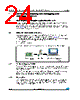
22 / 42 page  Installing the datalogger package on your computer AN3209 22/42 Doc ID 17419 Rev 2 3 Installing the datalogger package on your computer To install the datalogger package on your computer: 1. Execute the setup.exe file available from http://www.st.com/dualeeprom to install the M24LR64-R_Datalogger_application_software and copies the following folders on your computer (see Figure 16): – USB driver – .dll files – Source code of the M24LR64-R_Datalogger_application_firmware The RFID reader must not be connected to your PC. 2. When the installation is complete, connect the reader to the PC through an USB cable. 3. To install the USB driver, follow the steps described in section 31. of user manual UM0863 section 3.1. Figure 16. M24LR64-R_Datalogger_Application_Software folder structure |
|
リンク URL |
| ALLDATASHEETはお客様のビジネスに役立ちますか? [ DONATE ] |
Alldatasheetは | 広告 | お問い合わせ | プライバシーポリシー | データシートへのリンク | リンク交換 | メーカーリスト All Rights Reserved©Alldatasheet.com |
| Russian : Alldatasheetru.com | Korean : Alldatasheet.co.kr | Spanish : Alldatasheet.es | French : Alldatasheet.fr | Italian : Alldatasheetit.com Portuguese : Alldatasheetpt.com | Polish : Alldatasheet.pl | Vietnamese : Alldatasheet.vn Indian : Alldatasheet.in | Mexican : Alldatasheet.com.mx | British : Alldatasheet.co.uk | New Zealand : Alldatasheet.co.nz |
|
Family Site : ic2ic.com |
icmetro.com |
 Japanese ▼
 English
 Chinese
 German
 Japanese
 Russian
 Korean
 Spanish
 French
 Italian
 Portuguese
 Polish
 Vietnamese
 Indian
 Mexican
 British
 New Zealand